


Radxa Linkr Brings Remote KVM Access and Tailscale Support to a Thumb-Sized Device
Aug 1, 2026 — by Giorgio Mendoza 5,894 views
Radxa has unveiled the Linkr, a compact remote-control device for accessing computers, servers, and development boards through a web browser. The unit combines HDMI video capture with USB keyboard and mouse emulation, allowing users to view and operate a target system without connecting a dedicated monitor, keyboard, or mouse.
The Linkr connects to the target device through HDMI and USB-C. HDMI carries the video signal, while the USB connection supplies power and handles keyboard and mouse input. A second USB-C port supports network access through a direct USB connection or a USB-C-to-RJ45 adapter, while built-in wireless connectivity provides Wi-Fi client and hotspot modes.
— ADVERTISEMENT —
For access beyond the local network, the Linkr includes a built-in Tailscale client. Once connected to a Tailnet, the device can be reached through an encrypted connection without requiring a public IP address or manual port forwarding. Local Ethernet, Wi-Fi, hotspot, and USB access remain available when Tailscale is enabled.
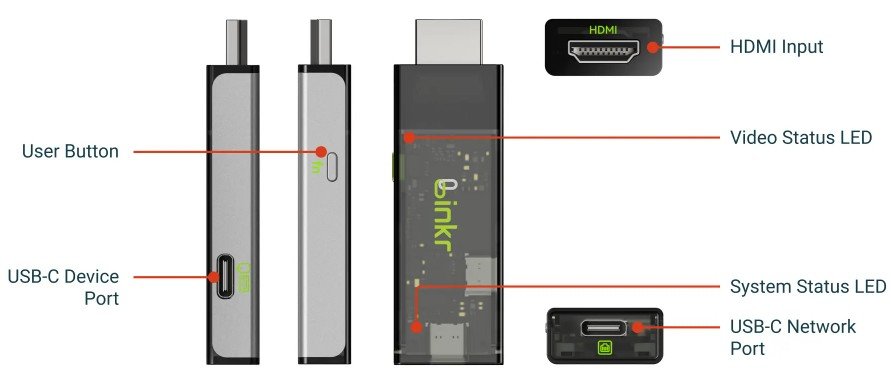
Linkr features
The HDMI input supports resolutions up to 2K at 30 Hz. Video can be streamed to the browser using H.264 or MJPEG, with the web interface also providing controls for image quality, scaling, display compatibility, screenshots, and screen recording.
Because the Linkr operates independently of software running on the target system, it can also be used in pre-boot environments such as BIOS or UEFI. This makes it suitable for remote setup, troubleshooting, operating-system installation, and system recovery.

Linkr configurations
Virtual media support allows ISO and IMG files to be mounted for software installation or offline maintenance. Virtual media can be stored on an optional 16GB eMMC module or a microSD card.
Radxa’s documentation describes several connection methods for different environments. The Linkr can be accessed over a local Ethernet or Wi-Fi network, through its own wireless hotspot, or by connecting it directly to a management computer over USB.
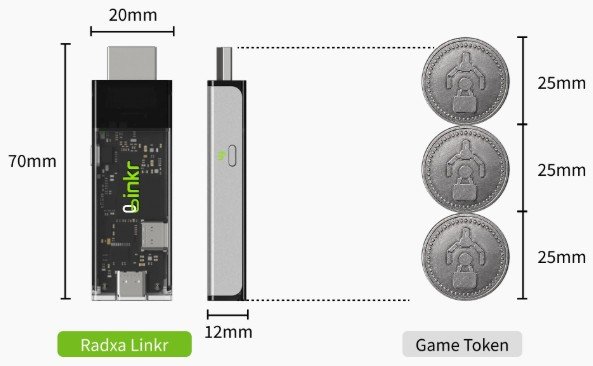
Linkr dimensions
The platform also supports access tokens for automation software and AI agents. According to Radxa, external tools can use the Linkr to capture the target screen and send keyboard or mouse input, enabling uses such as automated testing, remote diagnostics, and system-management workflows.
The browser interface can be accessed from Windows, macOS, Linux, iOS, Android, and HarmonyOS devices. Target compatibility depends primarily on the system providing HDMI output and accepting standard USB keyboard and mouse input.

Linkr demo
Additional features include Wake-on-LAN, virtual keyboard support, remote text entry, configurable shortcuts, firmware updates, and system log export. The accompanying documentation covers initial setup, network configuration, remote access, virtual media, security, Tailscale integration, and API-based automation.

Linkr package contents
The package includes USB-A-to-USB-C and USB-C-to-USB-C cables, a USB-C power and data splitter, and a USB-C-to-RJ45 adapter.
Further Information

Please comment here...